

BRON: https://winaero.com/windows-11-generic-keys-for-all-editions/
uiteraard tijdens het omzetten de internetverbinding verbreken.
KMS Client Product Keys for Windows 11
| Windows 11 Edition | KMS Client Key |
|---|---|
| Windows 11 Home | TX9XD-98N7V-6WMQ6-BX7FG-H8Q99 |
| Windows 11 Home N | 3KHY7-WNT83-DGQKR-F7HPR-844BM |
| Windows 11 Home Home Single Language | 7HNRX-D7KGG-3K4RQ-4WPJ4-YTDFH |
| Windows 11 Home Country Specific | PVMJN-6DFY6-9CCP6-7BKTT-D3WVR |
| Windows 11 Pro | W269N-WFGWX-YVC9B-4J6C9-T83GX |
| Windows 11 Pro N | MH37W-N47XK-V7XM9-C7227-GCQG9 |
| Windows 11 Pro for Workstations | NRG8B-VKK3Q-CXVCJ-9G2XF-6Q84J |
| Windows 11 Pro for Workstations N | 9FNHH-K3HBT-3W4TD-6383H-6XYWF |
| Windows 11 Pro Education | 6TP4R-GNPTD-KYYHQ-7B7DP-J447Y |
| Windows 11 Pro Education N | YVWGF-BXNMC-HTQYQ-CPQ99-66QFC |
| Windows 11 Education | NW6C2-QMPVW-D7KKK-3GKT6-VCFB2 |
| Windows 11 Education N | 2WH4N-8QGBV-H22JP-CT43Q-MDWWJ |
| Windows 11 Enterprise | NPPR9-FWDCX-D2C8J-H872K-2YT43 |
| Windows 11 Enterprise N | DPH2V-TTNVB-4X9Q3-TJR4H-KHJW4 |
| Windows 11 Enterprise G | YYVX9-NTFWV-6MDM3-9PT4T-4M68B |
| Windows 11 Enterprise G N | 44RPN-FTY23-9VTTB-MP9BX-T84FV |
| Windows 11 Enterprise LTSC 2019 | M7XTQ-FN8P6-TTKYV-9D4CC-J462D |
| Windows 11 Enterprise N LTSC 2019 | 92NFX-8DJQP-P6BBQ-THF9C-7CG2H |
To install Windows 11 with a generic product key, use the following values.
| Windows 11 Edition | Generic Key |
|---|---|
| Windows 11 Home | YTMG3-N6DKC-DKB77-7M9GH-8HVX7 |
| Windows 11 Home N | 4CPRK-NM3K3-X6XXQ-RXX86-WXCHW |
| Windows 11 Home Home Single Language | BT79Q-G7N6G-PGBYW-4YWX6-6F4BT |
| Windows 11 Home Country Specific | N2434-X9D7W-8PF6X-8DV9T-8TYMD |
| Windows 11 Pro | VK7JG-NPHTM-C97JM-9MPGT-3V66T |
| Windows 11 Pro N | 2B87N-8KFHP-DKV6R-Y2C8J-PKCKT |
| Windows 11 Pro for Workstations | DXG7C-N36C4-C4HTG-X4T3X-2YV77 |
| Windows 11 Pro for Workstations N | WYPNQ-8C467-V2W6J-TX4WX-WT2RQ |
| Windows 11 Pro Education | 8PTT6-RNW4C-6V7J2-C2D3X-MHBPB |
| Windows 11 Pro Education N | GJTYN-HDMQY-FRR76-HVGC7-QPF8P |
| Windows 11 Education | YNMGQ-8RYV3-4PGQ3-C8XTP-7CFBY |
| Windows 11 Education N | 84NGF-MHBT6-FXBX8-QWJK7-DRR8H |
| Windows 11 Enterprise | XGVPP-NMH47-7TTHJ-W3FW7-8HV2C |
| Windows 11 Enterprise N | WGGHN-J84D6-QYCPR-T7PJ7-X766F |
| Windows 11 Enterprise G N | FW7NV-4T673-HF4VX-9X4MM-B4H4T |
So, once you have installed Windows 11 with a generic product key, you won’t be able to activate it. However, you may change your mind and decide to make it fully functional. For that, you will need to replace the installed product key with the one that allows activation, e.g. with your retail key.
How to Change the product key in Windows 11
To change the product key in Windows 11 after installing it with a generic key, do the following.
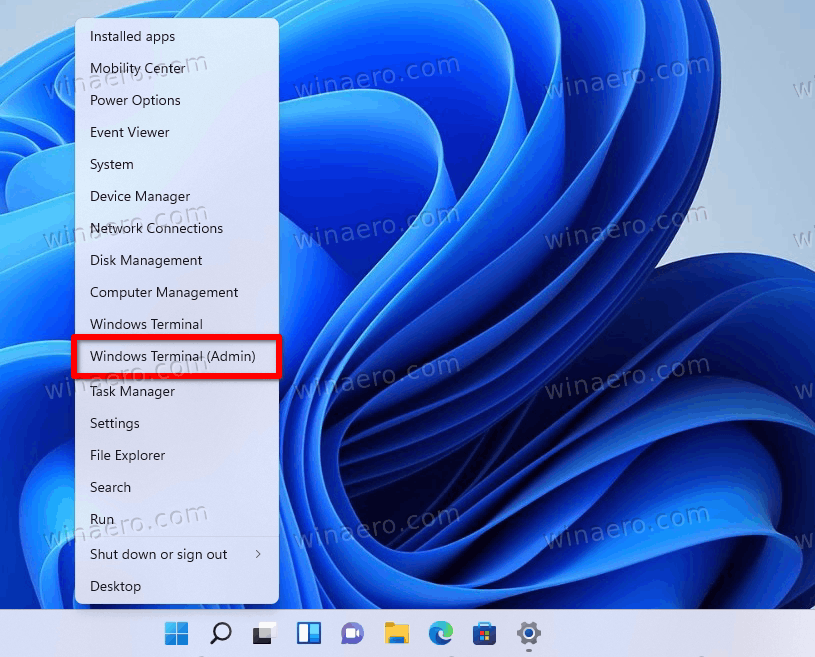
- Right-click the Start menu button and select Windows Terminal (Admin) to run it as Administrator.
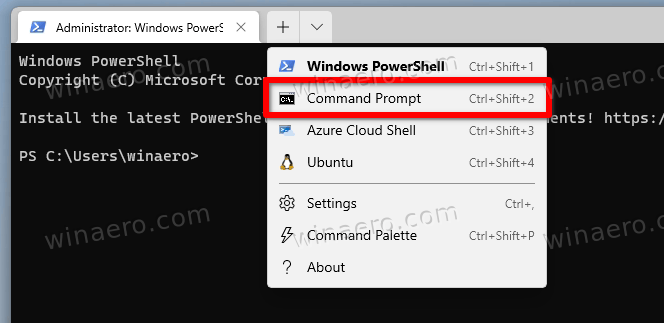
- If it defaults to PowerShell, press Ctrl + Shift + 2 or select Command Prompt from its menu.
- Type
slmgr /ipk <product key>, replacing the <product key> portion with the actual product key that supports activation.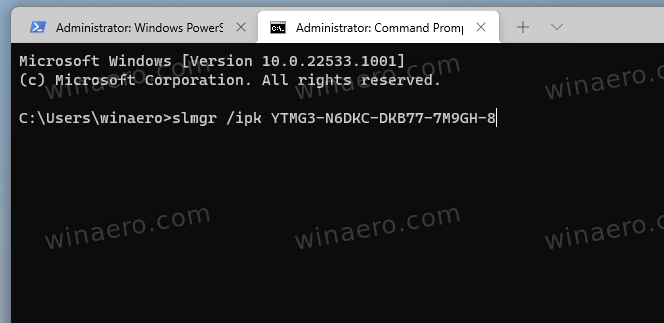
- If Windows 11 doesn’t active itself instantly, type the
slmgr.vbs -atocommand to force the activation process.
Alternatively, you can use the Settings app to change the product key in the GUI.
CHANGE THE WINDOWS 11 PRODUCT KEY IN SETTINGS
- Open the Windows 11 Settings app by pressing Win + I.
- Click System on the left.
- On the right, select Activation.
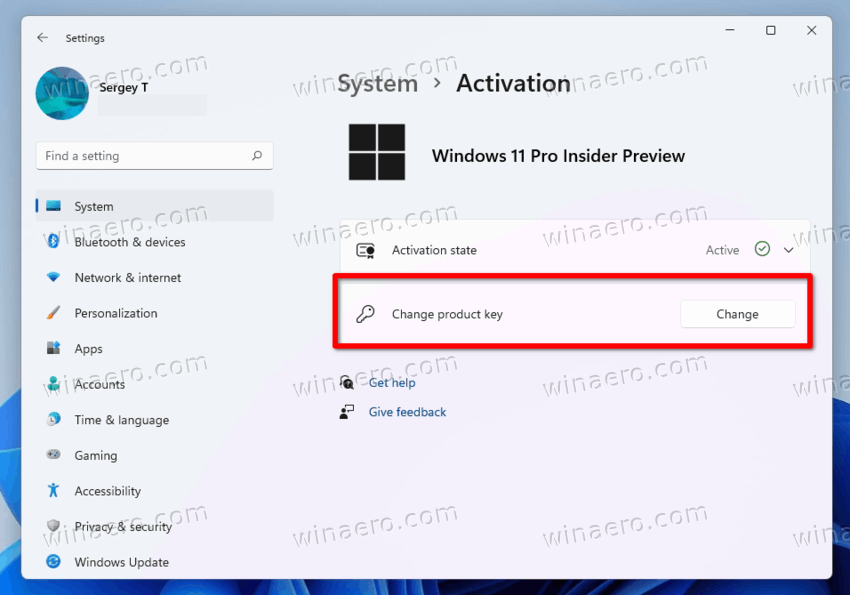
- On the next page, click the Change button under the Change product key section.
- Finally, type or copy-paste the new product key value you want to install in Windows 11.
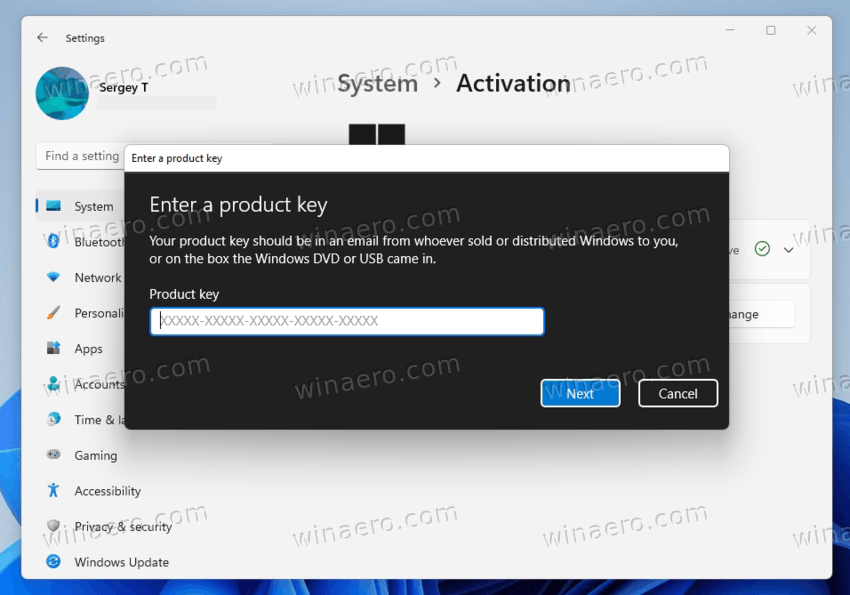
You are done. Now you know how to install Windows 11 with a generic key and activate it later with a product key.