papv2 aan.
reset pre shared key en username wachtwoord.
REG ADD HKLM\SYSTEM\CurrentControlSet\Services\PolicyAgent /v AssumeUDPEncapsulationContextOnSendRule /t REG_DWORD /d 0x2 /f
REG ADD HKLM\SYSTEM\CurrentControlSet\Services\RasMan\Parameters /v ProhibitIpSec /t REG_DWORD /d 0x0 /f
TL DR: Its a different Key, below, and I just straight up deleted it.
BACKUP LOG [SharePoint_Config_a621cd13-15e7-4c4f-8f8a-fd1fadc25c26] WITH TRUNCATE_ONLY
Go
Use [SharePoint_Config_a621cd13-15e7-4c4f-8f8a-fd1fadc25c26]
Go
DBCC SHRINKFILE([SharePoint_Config_a621cd13-15e7-4c4f-8f8a-fd1fadc25c26_log],2)
Go
To import contacts from your old outlook.nk2 file into Exchange 2010 Suggested contacts follow this procedure:To import .nk2 files into Outlook 2010, follow these steps:
1. Make sure that the .nk2 file is in the following folder:
%appdata%\Microsoft\Outlook
Note The .nk2 file must have the same name as your current Outlook 2010 profile. By default, the profile name is “Outlook.” To check the profile name, follow these steps:
a. Click Start, and then click Control Panel.
b. Double-click Mail.
c. In the Mail Setup dialog box, click Show Profiles.
2. Click Start, and then click Run.
3. In the Open box, type outlook.exe /importnk2, and then click OK. This should import the .nk2 file into the Outlook 2010 profile.
Note After you import the .nk2 file, the contents of the file are merged into the existing nickname cache that is currently stored in your mailbox.
After the import is finished the .nk2 gets renamed with an . file name extension on the first start of Outlook 2010. Therefore, if you try to re-import the .nk2 file, remove the . file name extension.
Windows XP gebruikers hebben niet het handige knip programma dat kan worden gebruikt in latere versies (vista en win7)
click
hier om een knip programma te downloaden voor XP.
Advertenties op maat?
google jij ook wel eens naar een koffie melk schuimer? en heb je dan de komende weken alleen maar melkschuim advertenties op alle websites die je bezoekt?
of log je in op een website bijvoorbeeld bol.com en wil je ook eens andere advertenties zien dan dat Bol voor jou heeft gekozen?
schijf je dan hier uit!
http://www.networkadvertising.org/managing/opt_out.asp
https://www.rapleaf.com/opt_out
Inlogscherm veranderen?
https://www.techspot.com/guides/224-change-logon-screen-windows7/
Step 1: Open the Windows Start menu and enter regedit into the search bar.
Step 2: Right click on HKEY_LOCAL_MACHINE and select Find.
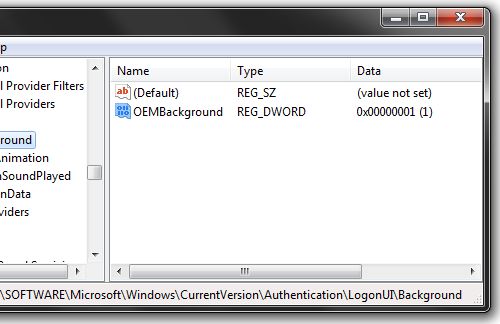
Step 3: Search for OEMBackground, which should be in Computer\HKEY_LOCAL_MACHINE\SOFTWARE\Microsoft\Windows\CurrentVersion\Authentication\LogonUI\Background. If the key does not exist, add a new DWORD value with the name OEMBackground.
Step 4: Double click on the entry OEMBackground, and change the value from 0 to 1.
Step 5: Open Windows Explorer and go to the following path: %windir%\system32\oobe.
Step 6: Create a new folder named info, and open it.
Step 7: Create a new folder within info named backgrounds.
Step 8: Rename your desired wallpaper as backgroundDefault.jpg and place it inside the folder backgrounds (images must be less than 245KB in size).